Live Chat

Live Traffic

Showing posts with label Internet. Show all posts

Free Download Sandboxie 4.02 Full Version

Sandboxie - Sandbox security software for Windows. Install and run programs in a virtual sandbox environment without writing to the hard drive. Sandboxie runs your programs in an isolated space which prevents them from making permanent changes to other programs and data in your computer.
Sandboxie 4.02 Benefits :
- Secure Web Browsing: Running your Web browser under the protection of Sandboxie means that all malicious software downloaded by the browser is trapped in the sandbox and can be discarded trivially.
- Enhanced Privacy: Browsing history, cookies, and cached temporary files collected while Web browsing stay in the sandbox and don't leak into Windows.
- Secure E-mail: Viruses and other malicious software that might be hiding in your email can't break out of the sandbox and can't infect your real system.
- Windows Stays Lean: Prevent wear-and-tear in Windows by installing software into an isolated sandbox.
Sandboxie 4.02 Features :
- Full protection is offered on both 32-bit and 64-bit Windows. The Experimental Protection feature, which enabled full protection on 64-bit Windows, is no longer needed, and was removed.
- Improved compatibility with avast!, Driver Verifier, EMET, F-Secure, KeyScrambler, Lingoes, Listary, Norton Internet Security, Office 2013, PGP, Proxifier, ProxyCap, Solid Converter PDF, Windows 8.
- Removed support for Windows 2000. Service Pack 3 is required for use on Windows XP.

6:56 PM | 0 comments | Read More

Latest Update Aircrack-ng 1.2 Beta 1 Release

Aircrack-ng is a set of tools for auditing wireless networks. Aircrack-ng is an 802.11 WEP and WPA-PSK keys cracking program that can recover keys once enough data packets have been captured. It implements the standard FMS attack along with some optimizations like KoreK attacks, as well as the all-new PTW attack, thus making the attack much faster compared to other WEP cracking tools.
Latest Update Aircrack-ng 1.2 Beta 1 Release Notes:
- Compilation fixes on all supported OSes.
- Makefile improvement and fixes.
- A lot of fixes and improvements on all tools and documentation.
- Fixed licensing issues.
- Added a few new tools and scripts (including distributed cracking tool).
- Fixed endianness and QoS issues.

6:37 PM | 0 comments | Read More
OWASP Mantra Security Framework Toolkit

OWASP Mantra is a free and open source security toolkit with a collection of add-ons and scripts based on Firefox and Chromium. OWASP Mantra security framework toolkit is intended for web application penetration testers, web application developers, security professionals, etc.
OWASP Mantra Security Framework Toolkit features :
Information Gathering
Flagfox - Displays a flag icon indicating the current webserver's physical location with many additional features.
JSView - Get straight access to scripts and stylesheets included in the current web page.
PassiveRecon - Perform passive discovery of target resources utilizing publicly available information.
Wappalyzer - Uncovers underlying technologies used on websites like CMS, e-commerce systems, JavaScript frameworks, analytics tools etc..
View Dependencies - Shows you all the files which were loaded to show the current page.
Link Sidebar - View, search and test hyperlinks in a web page.
Application Auditing
Hackbar - Simple security audit / Penetration test tool.
RESTClient - Visit and test RESTful/WebDav services.
Tamper Data - Use tamperdata to view and modify HTTP/HTTPS headers and post parameters.
Live HTTP Headers - View HTTP headers of a page and while browsing.
RefControl - Control what gets sent as the HTTP Referer on a per-site basis.
User Agent Switcher - Various web developer tools on browser.
Web Developer - Various web developer tools on browser.
DOM Inspector - Inspect and edit the live DOM of any web document or XUL application.
Inspect This - Inspect the current element with the DOM Inspector.
Form Fox - Displays the form action, the site to which the information you've entered is being sent.
SQL Inject Me - Test for SQL injection vulnerabilities which can cause a lot of damage to a web application.
XSS Me - Test for XSS vulnerabilities which can cause a lot of damage to a web application.
Cookies Manager+ - View, edit and create cookies.
Firecookie - View and manage cookies.
Autofill Forms - Autofill Forms enables you to fill out web forms with one click or a keyboard shortcut.
Cookie Monster - Cookie Monster provides proactive cookie management on a site or domain level basis, including 3rd party cookies.
Fireforce - Brute-force attacks on GET or POST forms.
Groundspeed - Groundspeed is an add-on that allows security testers to manipulate the application user interface to eliminate annoying limitations and client-side controls that interfere with the web application penetration tests.
Http Requester - A tool for easily making HTTP requests (GET/PUT/POST/DELETE), viewing the responses, and keeping a history of transactions.
Modify Headers - Add, modify and filter the HTTP request headers sent to web servers. This addon is particularly useful for Mobile web development, HTTP testing and privacy.
Poster - A developer tool for interacting with web services and other web resources that lets you make HTTP requests, set the entity body, and content type.
Editors
JSView - Get straight access to scripts and stylesheets included in the current web page. View the source code external stylesheets and javascripts.
Firebug - Edit, debug, and monitor CSS, HTML, and JavaScript live in any web page.
Proxy
HTTP Fox - A built in local proxy for analyzing traffic.
FoxyProxy - A proxy management tool with ability to switch between multiple proxies with few clicks.
Proxy Tool - A proxy management tool with lots of additional features to enahnce the privacy.
Network Utilities
FireFTP - FTP/SFTP Client which provides intuitive access to FTP/SFTP servers.
SQLite Manager - Manage any SQLite database on your computer.
FireSSH - SSH Client.
DNS Cache - Allows you to disable and enable the DNS Cache of Firefox.
HTTP Fox - Monitors and analyzes all incoming and outgoing HTTP traffic between the browser and the web servers.
Misc
Greasemonkey - Customize the way webpages look and function. A userscript manager for Firefox.
Greasefire - Automatically finds Greasemonkey scripts on Userscripts.org.
CacheToggle - Disable and optionally clear the browser cache with the flick of a switch.
URL Flipper - Easily increment or decrement a portion of a URL without having to manually edit the text in the Location Bar.
Event Spy - DOM Event spy addon. Lets you watch JavaScript events as they occur.
Stacked Inspector - Switch DOM Inspector to an over/under vertical layout instead of the usual side-by-side panel layout.
Scriptish - The greatest user script engine on the Internet (a fork of Greasemonkey).
Session Manager - Session Manager saves and restores the state of all windows. It can also automatically save the state of open windows individually.
Fire Encrypter - Encrypt, decrypt and hashing functions utility.
DownThemAll - An easy to use and fucntional download manager.
Application Auditing
Websecurify - Websecurify is a powerful, cross-platform web security testing technology designed from the ground up with simplicity in mind.
Ra.2 - Blackbox DOM-based XSS Scanner.
Ref Spoof - Easy spoofing of the URL referer (referrer) featuring a toolbar.
NoRedirect - Take control of web page redirects for fun and profit.
And More Great Tools....
5:57 PM | 1 comments | Read More

Comodo Ice Dragon Fast Internet Browser

Comodo Ice Dragon is a fast Internet browser based on Mozilla Firefox which features several security, performance and feature enhancements over the core build. Fully compatible with FireFox plugins and extensions, Ice Dragon combines the freedom and functionality of FireFox with the unparalleled security and privacy of Comodo.
Comodo Ice Dragon Fast Internet Browser features :
SiteInspector malware scanning technology : SiteInspector link scanning feature allows you to check whether a web page is malicious before you actually visit that page.
Secure DNS service : Ice Dragon users are also given the option to use Comodo Domain Name System (DNS) servers.
Social media integration : Ice Dragon dedicated social media button makes it easy to instantly share your web-finds with your Facebook, Twitter or LinkedIn friends.
Privacy and performance enhancements : Ice Dragon features several tweaks to the core Firefox build to improve both security and performance.
Designed with you in mind : It’s the result of thousands of hours of careful usability testing.
Comodo Ice Dragon Fast Internet Browser

12:09 AM | 0 comments | Read More

BackTrack 5 R3 Linux Penetration Testing

BackTrack is a linux penetration testing arsenal that aids security professionals in the ability to perform assessments in a purely native environment dedicated to hacking. Regardless if you’re making BackTrack you Install BackTrack, boot it from a Live DVD or thumbdrive, the penetration distribution has been customized down to every package, kernel configuration, script and patch solely for the purpose of the penetration tester.
BackTrack is intended for all audiences from the most savvy security professionals to early newcomers to the information security field. BackTrack promotes a quick and easy way to find and update the largest database of security tools collection to date. BackTrack community of users range from skilled penetration testers in the information security field, government entities, information technology, security enthusiasts, and individuals new to the security community.
BackTrack 5 R3 has been released. BackTrack 5 R3 Linux Penetration Testing focuses on bug fixes as well as the addition of over 60 new tools, several of which were released in BlackHat and Defcon 2012. A whole new tool category was populated “Physical Exploitation”, which now includes tools such as the Arduino IDE and libraries, as well as the Kautilya Teensy payload collection.
4:01 PM | 0 comments | Read More

Fiddler Web Debug Proxy

Fiddler is a Web Debugging Proxy which logs all HTTP ( HTTPS ) traffic between your computer and the Internet. Fiddler allows you to inspect traffic, set breakpoints, and "fiddle" with incoming or outgoing data. Fiddler includes a powerful event-based scripting subsystem, and can be extended using any .NET language. Fiddler can debug traffic from virtually any application that supports a proxy, including Internet Explorer, Google Chrome, Apple Safari, Mozilla Firefox, Opera, and thousands more. You can also debug traffic from popular devices like Windows Phone, iPod/iPad, and others. Fiddler2 includes the ability to decrypt, view, and modify HTTPS secured traffic for debugging purposes. The decryption feature is disabled by default. Enable the traffic decryption option by clicking Tools > Fiddler Options > HTTPS and ticking the Decrypt HTTPS Traffic box.
Fiddler 2.4.0.3 [8/3/2012] bug fix :
Improved composer
Improved Performance
Add Files > Recent menu
Updated sounds for script load
Add fiddler.Lint.HTTP feature
Various bugfixes
Fiddler Web Debug Proxy
9:36 AM | 0 comments | Read More

Firestarter Linux Firewall Program

Firestarter is an Open Source visual Linux firewall program. Firestarter aims to combine ease of use with powerful features, therefore serving both Linux desktop users and system administrators. 
Firestarter Linux Firewall Program Features :
Open Source software, available free of charge
User friendly, easy to use, graphical interface
A wizard walks you through setting up your firewall on your first time
Suitable for use on desktops, servers and gateways
Real-time firewall event monitor shows intrusion attempts as they happen
Enables Internet connection sharing, optionally with DHCP service for the clients
Allows you to define both inbound and outbound access policy
Open or stealth ports, shaping your firewalling with just a few mouse clicks
Enable port forwarding for your local network in just seconds
Option to whitelist or blacklist traffic
Real time firewall events view
View active network connections, including any traffic routed through the firewall
Advanced Linux kernel tuning features provide protection from flooding, broadcasting and spoofing
Support for tuning ICMP parameters to stop Denial of Service (DoS) attacks
Support for tuning ToS parameters to improve services for connected client computers
Ability to hook up user defined scripts or rulesets before or after firewall activation
Supports Linux Kernels 2.4 and 2.6
Translations available for many languages
4:32 PM | 0 comments | Read More

Internet Connection Using OpenVPN on Linux Ubuntu

OpenVPN is an open source application to create P2P connections are secure and encrypted via the route configuration and remote access facilities. So as to create virtual private network (VPN). Openvpn using a custom security protocols that use SSL / TLS for key exchange. It is capable of traversing network address translation (Nat) and firewalls. OpenVPN uses the OpenSSL library to provide encryption of data and control channels. It lets OpenSSL do all the encryption and authentication work in the network protocol. OpenVPN uses all of the ciphers available in the OpenSSL package. OpenSSL uses HMAC authentication package features to add an additional layer of security for the connection (Firewall HMAC).
So with openvpn will be securely connected to the Internet through your favorite linux ubuntu. To setup openvpn in ubuntu linux is more difficult than windows 7. Because it requires additional configuration in order to connect without a problem. Internet connection using openvpn on Linux Ubuntu, I have been trying to use openvpn 2.3 alpha2 on linux ubuntu 11.10.
Step internet connection using openvpn on linux ubuntu :
- Download OpenSSL , then install.
- Download PolarSSL , then install.
- Download OpenVPN , then install.
- Download OpenVPN Linux Ubuntu (contains a sample configuration openvpn).
After all the work, now how to use the internet connection with openvpn on linux ubuntu :
- Create a path in the home or wherever =>> /home/config
- Put the openvpn sample configuration file in the path =>> /home/config
- Change the connection settings to use DNS in network connections such as google dns: 8.8.8.8 and 8.8.4.4
- Connect your modem, after connecting internet
- Open your ubuntu terminal =>>archer@ubuntu:~$cd config =>>archer@ubuntu:~/config$
- Last run openvpn from terminal =>> archer@ubuntu:~/config$ sudo openvpn --config TCP.ovpn
- Done and Enjoy !!!
10:18 PM | 0 comments | Read More

Speed ​​Internet Connection in Linux Ubuntu

Speed ​​internet connection in linux ubuntu can be improved in many ways. One of them by optimizing the basic settings. So you can increase speed ​​internet connection without any software. How it works together to improve the internet connection between linux ubuntu with windows 7. This arrangement will maximize internet connection. And the result, internet connection speeds have increased from the previous.
Settings to increase speed ​​internet connection in linux ubuntu :
$sudo gedit /etc/sysctl.conf
#net.ipv4.conf.default.rp_filter=1
#net.ipv4.conf.all.rp_filter=1
#net.ipv4.tcp_syncookies=1
#net.ipv4.ip_forward=1
#net.ipv6.conf.all.forwarding=1
#net.ipv4.conf.all.secure_redirects = 1
#net.ipv4.conf.all.log_martians = 1
#net.core.rmem_max = 16777216
#net.core.wmem_max = 16777216
#net.ipv4.tcp_rmem = 87380
#net.ipv4.tcp_wmem = 87380
#net.ipv4.tcp_no_metrics_save = 1
#net.ipv4.tcp_moderate_rcvbuf = 1
#net.core.netdev_max_backlog = 2500
#net.core.netdev_max_backlog = 30000
#net.ipv4.tcp_timestamps = 0
#net.ipv4.tcp_sack = 0
#net.ipv4.tcp_window_scaling = 1
#net.ipv4.tcp_fin_timeout = 60
#net.ipv4.tcp_retries1 = 3
#net.ipv4.tcp_keepalive_probes = 9
#net.ipv4.tcp_keepalive_time = 7200
#net.ipv4.tcp_syn_retries = 5
$sudo gedit /etc/network/interfaces
auto lo
iface lo inet loopback
$sudo gedit /etc/ppp/ip-up
$3   The link speed    115200
$sudo gedit /etc/ppp/ip-down
$3   The link speed    115200
$sudo gedit /etc/nsswitch.conf
hosts: files mdns4_minimal [NOTFOUND=return] dns mdns4
hosts: files dns
3:04 PM | 0 comments | Read More

Advanced Host Monitor Enterprise 9.22

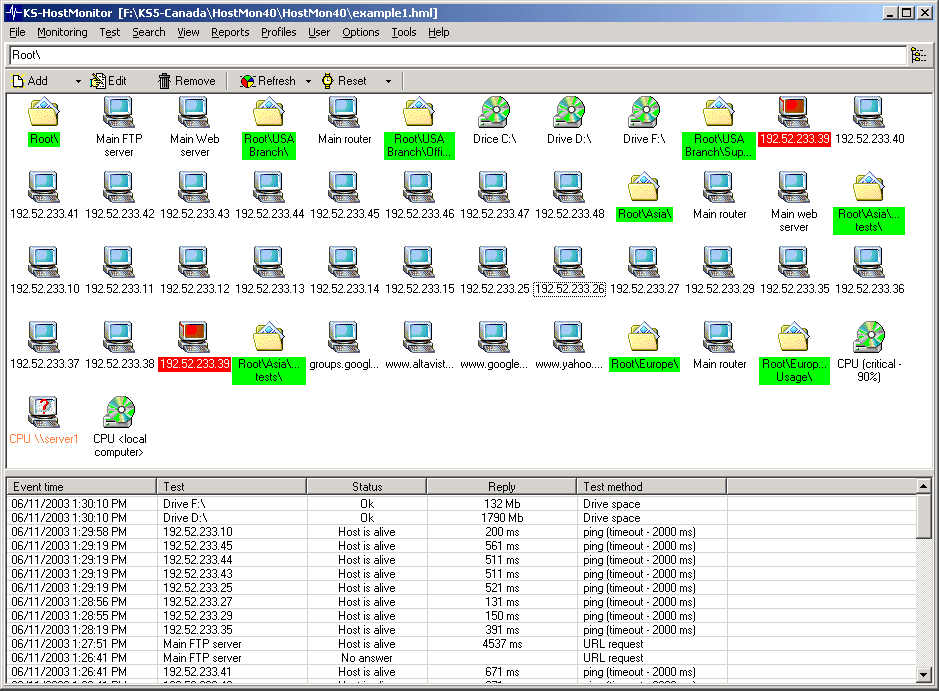
Host Monitor is a system management tool that continuously monitors servers availability and performance. In the event of network errors, Host Monitor will alert the network administrator (or even correct the problem when possible) before problems get seriously out of hand. Advanced Host Monitor helps protect your company data and reduces the likelihood of costly network failures.
Advanced Host Monitor Enterprise features :
Powerful Report Manager and Log Analyzer
Remote Monitoring Agents for Windows, FreeBSD, Linux, NetBSD, OpenBSD and Solaris
Web service, Telnet service, Remote Control Console
Utilities and auxiliary applications : Log Analyzer, Replicator, HML Manager, RMA, RMA for UNIX, RMA Manager, RCC, Web Service, Telnet Service, WMI Explorer, MIB Browser, Watch Dog
IP Tools provides 19 TCP/IP utilities : Local Info, Connection Monitor, NetBIOS Info, NB Scanner, SNMP Scanner, Name Scanner, Port Scanner, UDP Scanner, Ping Scanner, Trace, WhoIs, Finger, LookUp, GetTime, Telnet Client, HTTP Client, IP-Monitor, Host Monitor, Trap Watcher

2:20 PM | 0 comments | Read More

Remote Desktop Manager Enterprise 7.4.6.0

Remote Desktop Manager is a small application used to manage all your remote connections. Add, edit, delete, organize or find your remote connection quickly. Compatible with Microsoft Remote Desktop, Terminal Services, VNC, LogMeIn and Team Viewer, Ftp, SSH, Telnet and more. With Remote Desktop Manager Enterprise, you can share all your remote connection inside your company with SQL Server. Also, with the multiple datasource, each user can have their own personal remote connections. To be able to use Remote Desktop Manager Enterprise your operating system must be installed a minimum of Microsoft. NET Framework 3.5 +.
Remote Desktop Manager Enterprise integrate many tools and protocols :
Microsoft Remote Desktop
Microsoft Remote Assistance
pcAnywhere
Team Viewer
Radmin
VNC
Dameware
X Window
HP RGS
Logmein
Citrix (ICA / HDX)
12:59 PM | 1 comments | Read More

Oracle Linux 6.3

Oracle Linux 6.3 release of the Unbreakable Enterprise Kernel has been improved/enhanced by Oracle in several areas, including bug fixes and extended functionality. All of these modifications have been contributed back upstream and are available in mainline Linux.
- Bug Fixes added by Oracle Linux 6.3 :
Fix __put_nfs_open_context() NULL pointer panic [orabug 12687646]
Fix scsi hotplug and rescan race [orabug 10260172]
Fix filp_close() race [orabug 10335998]
Fix missing aio_complete() in end_io [orabug 10365195]
Make xenkbd.abs_pointer=1 by default [orabug 67188919]
Check to see if hypervisor supports memory reservation change [orabug 7556514]
Enable entropy for bnx2,bnx2x,e1000e,igb,ixgb,ixgbe,ixgbevf [orabug 10315433]
Add xen pv netconsole support [orabug 6993043] [bz 7258]
shrink_zone patch [orabug 6086839]
Fix aacraid not to reset during kexec [orabug 8516042]
Patch rds to 1.4.2-20 [orabug 9471572, 9344105]
Fix BUG_ONs to not fire when in a tasklet -RDS
Fix lockup of the tx queue - ipoib
Do not call set_page_dirty() with irqs off - RDS
Properly unmap when getting a remote access error - RDS
Fix locking in rds_send_drop_to() - RDS
Too many getattr and access calls after direct I/O [orabug 9348191]
Fix PVHVM guest with PoD crash under memory pressure [orabug 9107465]
Fix PV guest with FC HBA hang during shutdown [orabug 9764220]
Support 256GB+ memory for pv guest [orabug 9450615]
Fix overcommit memory to use percpu_counter [orabug 6124033]
Make configurable timeouts for kcs of ipmi [orabug 9752208]
Fix memory corruption - ipoib [orabug 9972346]
Patch removes limit on number of retries an aio can submit [orabug 10044782]
Do not call loop_unplug for not configured loop device [orabug 10314497]
Link detection does not work with 802.3ad bonding [orabug 12377284]
- Storage :
The megaraid driver to version 5.40, which provides a fix for FastPath I/O to work with degraded RAID 1.
The qla2xxx 4G and 8G driver firmware to version 5.06.01.
The qla2xxx driver to version 8.03.07.09.05.08-k, which provides support for ISP82xx to capture a dump (a minidump) on when failure occurs.
The qla4xxx driver to version 5.02.04.00.05.08-d0.
The lpfc driver to version 8.2.0.108.1p.
The bnx2i driver to version 2.7.0.3.
The bfa firmware to version 3.0.2.2.
The mpt2sas driver to version 09.100.00.00, which adds support for customer specific branding.
The mptsas driver to version 3.04.20rh.
The uIP driver to version 0.7.0.12 as a part of the updated iscsi-initiator-utils package.
The megaraid_sas driver to version 5.40-rh1.
- Network :
The bnx2x driver firmware to version 7.0.23, which provides support for new Broadcom 578xx chips.
The bnx2x driver to version 1.70.x.
The bnx2i driver to version 2.7.0.3+.
The bnx2 driver to version 2.1.11.
The cnic driver to version 2.5.3+.
The netxen_nic driver to version 4.0.77, which adds support for VLAN RX HW acceleration.
The tg3 driver to version 3.119.
The ixgbe driver to upstream version 3.4.8-k.
The ixgbevf driver to upstream version 2.1.0-k.
The e1000e driver to version 1.4.4.
The bna driver to version 3.0.2.2, which provides support for the Brocade 1860 AnyIO Fabric Adapter.
The qlge driver to version 1.00.00.29.
The qlcnic driver to version 5.0.18.
The enic driver to version 2.1.1.24.
9:42 PM | 1 comments | Read More

Remote Computer Software : Network LookOut Administrator Professional 3.8.1

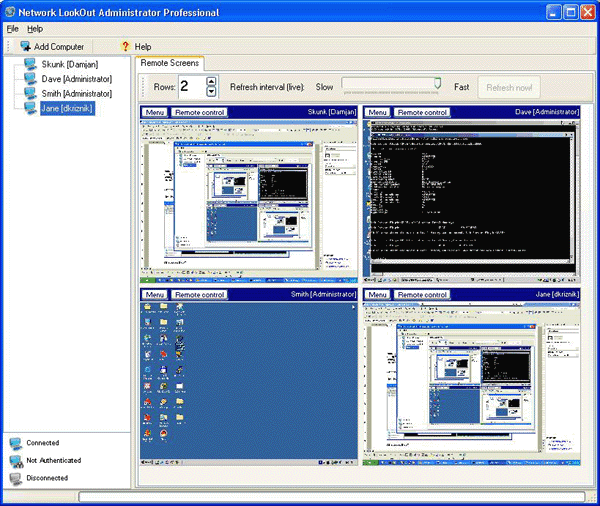
Network LookOut Administrator Professional is remote computer software . Network LookOut Administrator Professional Software allows you to see live screens of remote computer. If you are an administrator, you can easily administer remote computer from your computer. To increase your efficiency the console now include several tools that can be executed on all or just selected remote computers. You have also a full control over running processes on remote computers. Application works through Internet, LAN, WLAN or VPN. Agent can be remotely installed. Communication uses encrypted data streams.
Benefits of using Network LookOut Administrator Professional Software :
For monitoring your children’s activities on a remote computer.
For monitoring students in the classroom to achieve better discipline or, just to assist them (by using the remote control feature) when they are in trouble.
For lowering your business costs by monitoring what your employees are doing on their computers and helping them when they call you. Using the remote control feature enables you to fix problems remotely without visiting them; this saves you precious time.
For administrating all computers just from one location – your computer.
Turning off, restarting, hibernating …. remote computers with one click.
Network LookOut Administrator Professional 3.8.1 features :
Displaying a live picture of a remote computer.
You can take control of a remote computer by controlling its mouse and keyboard.
More remote screens can be displayed in a table.
A remote screen can be zoomed to an actual size.
The name of the connected user is displayed.
When lower bandwidth is required, the refresh interval can be enlarged.
Power off, restart, hibernate, suspend remote computers
Log off desktop users
Lock workstation
Control screensaver
Automatic connection to a remote computer is optional.
Settings for the agent are encrypted and password protected.
Connection to a remote computer is password protected.
Access to monitoring the console is password protected. If more users use the same computer, different profiles and access passwords can be set.
More monitoring consoles can be connected to the same remote computer.
You have full control over running processes.
Application can optionally use encrypted communication.
Agent can be remotely installed.
10:08 PM | 2 comments | Read More

cFosSpeed 8.00 Build 1946 Full Version

cFosSpeed is a software that can optimize the data transfer through Traffic Shaping. Traffic Shaping is a method for optimizing the Internet traffic. This makes it possible to ensure maximum speed Ping.
cFosSpeed 8.00 Build 1946 full version features :
Connections:
- Broadband: Cable and DSL
- Narrow band: Modem and ISDN
- Mobile (UMTS, HSDPA, GSM, GPRS, HSCSD)
- DSL, PPPoE
- DSL, PPPoA (VCmux and LLC)
- DSL, PPTP
- VDSL
- Cable
- ISDN
- IP over AAL
- RFC1483/2684 bridged
Routing:
- Router and dial-up connections
- LAN and WLAN
- Modes Router and Bridge
- VPN
- Multiple connections simultaneously
- Adjustable routes
- Several IP adresses per adapter
Traffic Shaping:
- Multi-user version
- TX and RX prioritization
- L7 Protocol Analysis
- Prioritization of Programs
- RTP / VoIP Detection
- 5 priority queues
- Individual rules with filter language
 cFosSpeed 8.00 Build 1946 full version
10:51 AM | 0 comments | Read More